
Apple Health AI Study: How to Join on iPhone
Apple's new Health AI Usage Study lets US iPhone users ask health questions to an AI. See who qualifies, how to join, what data you share and its limits.

On November 15, 2026, Apple opened the Apple Health AI Usage Study, a research study with its own iPhone app where you can ask health questions and get answers backed by medical journals. It’s free and open to up to 200,000 people in the US, but it isn’t a new Siri feature and it isn’t a doctor. This guide explains who can join, how to sign up, what you share and when it’s better to skip it.
Before you start: This is a research study, so its rules can change while it runs. This guide is based on Apple’s announcement, the App Store listing and coverage from TechCrunch and ABC News as of November 17, 2026. Apple hasn’t published a step-by-step support page for it yet.
Quick answer
If you live in the US, you’re 21 or older and you have an iPhone 15 Pro or newer with Apple Intelligence turned on and iOS 26 or later, download the free Apple Health AI Study App from the App Store, open it, tap Get Started, read the study details and give your consent. Sharing your Health data is optional. The app is in English only, and it doesn’t diagnose or treat anything.
What the Apple Health AI Usage Study is
It’s a virtual research study run by Apple with OpenEvidence, a clinical AI platform that Apple describes as widely used by doctors and other healthcare professionals. OpenEvidence provides the medical AI; Apple built the app and the research experience around it.
Apple says the goal is to learn what makes people trust a health AI, how good and how understandable its answers are, and whether it helps with everyday health decisions. In other words, you’re not just getting a free tool: your questions and your ratings are the research.
According to the App Store listing, you can use the app to:
- Understand symptoms or conditions.
- Put your own Health data in context.
- Prepare for a doctor’s visit.
- Build a personalized exercise or meal plan.
Each answer comes with linked citations from peer-reviewed sources. Apple and TechCrunch name The New England Journal of Medicine, JAMA and Nature among them.
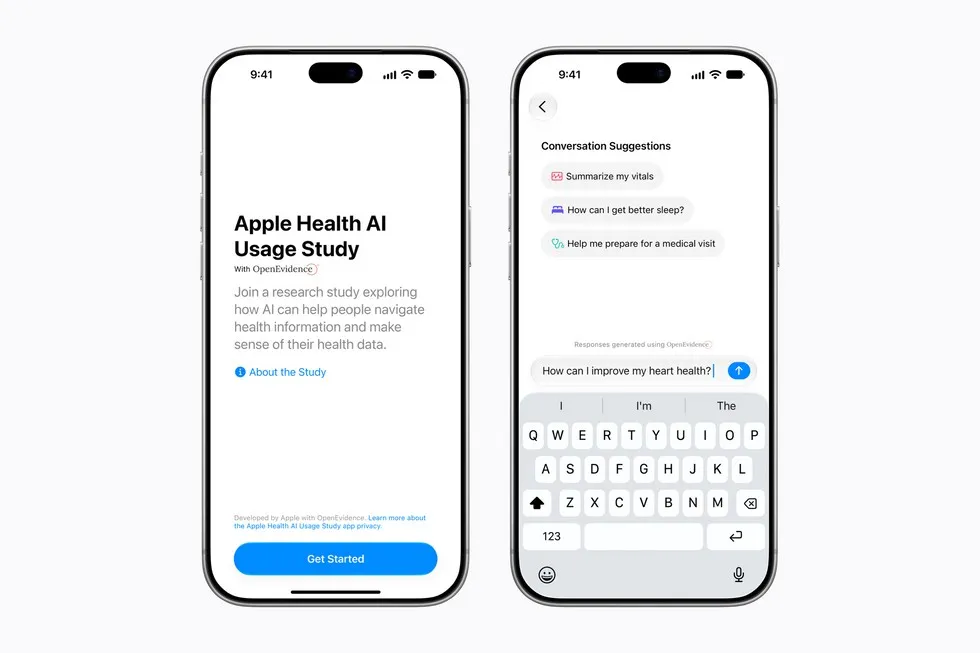
Image: Apple
Who can join
| Requirement | What Apple asks for |
|---|---|
| Country | United States |
| Age | 21 or older |
| iPhone | iPhone 15 Pro or later, with Apple Intelligence |
| Software | iOS 26 or later |
| Apple Intelligence | Turned on |
| Language | The app is listed in English only |
| Cost | Free |
| Spots | Up to 200,000 participants |
A few details worth knowing:
- The iPhone model matters. Apple says iPhone 15 Pro or later. Some coverage says “iPhone 15 or later,” but the regular iPhone 15 and 15 Plus don’t support Apple Intelligence, so go by Apple’s wording. To check your model, open Settings > General > About and look at Model Name.
- Apple Intelligence must be on. If you haven’t set it up, our guide to turn on Siri AI on iPhone walks you through it.
- The App Store says the app runs on iPhone, iPad and iPod touch, but the study itself is described for eligible iPhones. Don’t count on joining from an iPad.
- No Apple Watch is required. None of the sources mention one, although Watch data like sleep or heart rate can make answers more personal if you choose to share it.
- Spots are limited. Apple caps the study at 200,000 people and hasn’t said what happens once it’s full.
How to join, step by step
- Check your iOS version in Settings > General > Software Update and install any pending update.
- Open the App Store and search for Apple Health AI Study App (seller: Apple Inc.). It’s free and about 30 MB.
- Open the app and tap About the Study to read what’s involved before you commit.
- Tap Get Started and follow the screens to confirm you’re eligible and give your informed consent, as ABC News describes.
- When iOS asks for access to your Health data, choose exactly which categories to share, or none. Apple says this is entirely up to you.
- Start asking. The chat suggests prompts like “Summarize my vitals,” “How can I get better sleep?” or “Help me prepare for a medical visit.”
Apple hasn’t published screenshots of every enrollment screen, so the exact wording may differ slightly on your iPhone.
What you’ll be asked to do
Joining a study means a bit of work in return:
- Rate answers. The app asks you to judge the quality of responses and leave feedback.
- Answer surveys. TechCrunch reports monthly surveys; ABC News calls them “occasional.” Apple doesn’t give a frequency.
- Stay for the long run. TechCrunch says the study runs for more than 12 months. Apple hasn’t stated a duration.
None of the sources mention payment or rewards for taking part, so assume there are none.
What data you share and how it’s protected
This is the part to read twice before you join.
- Health data is optional. You decide whether the app can read metrics such as resting heart rate, activity, sleep or lab results. With that data, answers can refer to your own numbers instead of general advice.
- Surveys are optional too. Apple says participants keep control over whether to share HealthKit metrics or survey responses.
- No model training. Apple says study data won’t be used to train AI models.
- Identifying details are removed. According to ABC News, questions pass through privacy protections designed to strip identifying information before they reach OpenEvidence.
- Short retention at OpenEvidence. ABC News and TechCrunch report that OpenEvidence deletes question-and-answer data within 24 hours and doesn’t train on it.
You can review or change Health access later in Settings > Privacy & Security > Health, then select the study app. Apple’s announcement doesn’t explain how to leave the study or delete what you’ve already contributed, so read that part of the consent screen carefully before you agree.
What it can’t do
Apple is clear that the app doesn’t diagnose or treat any condition and doesn’t replace a doctor. ABC News adds that it doesn’t monitor you in real time. Apple says it has guardrails meant to detect certain concerning questions and point you to a healthcare provider or other resources.
In practice:
- Emergencies: don’t type them into an app. Call 911.
- Medication changes: talk to your doctor or pharmacist, even if the answer sounds convincing.
- Second opinions: use it to understand terms and prepare questions, not to decide treatment.
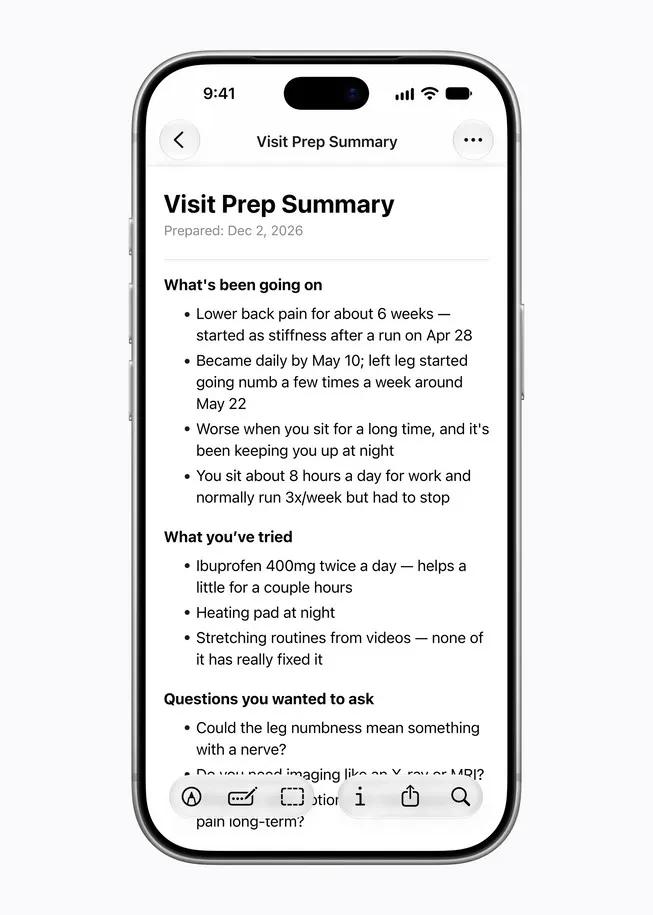
Image: Apple
The visit prep feature is probably the most useful part for most people: it turns a messy conversation into a short summary of what’s been happening, what you’ve tried and what you want to ask, which you can bring to your appointment.
Is it the same as Siri or the Health app?
No. The study app is separate from Siri and from the Health app. Apple is also testing a redesigned Health app in the iOS 27.3 beta, but that’s a different project. TechCrunch notes it’s not clear whether Apple plans to bring AI health answers to Siri or the Health app later. If you’d rather keep Siri away from your health apps in the meantime, see how to block Siri from specific apps.
Should you join?
It’s worth it if you have an eligible iPhone, you’re comfortable in English and you often look up health questions online. You get cited answers instead of random search results, plus visit summaries for your doctor, and you help shape how Apple builds health AI.
Skip it if you’d rather not share health questions with any study, you need answers in Spanish (the app is English only for now), or you’re dealing with a serious condition where you need a professional, not a chatbot.
Our recommendation: join without sharing Health data at first, try it for a week with low-stakes questions, and only then decide whether to connect your sleep, heart or lab data.
Sources
- Apple Newsroom: Apple launches research study to explore the use of AI for health
- App Store: Apple Health AI Study App
- Apple Newsroom: Redesigned Health app expands language support
- TechCrunch: Apple launches new app to study how people use AI for health
- ABC News: Apple launches an AI health tool as part of a research study